5 Ways to Organize Imported Recipes by Cuisine
Five practical ways to sort imported recipes by cuisine—use folders, AI tagging and translation, ingredient search, themed meal plans, and pantry syncing.


Ever lose a recipe you saved on TikTok or Instagram? It happens to all of us. But organizing recipes by cuisine can save time and make meal planning simple. Here's how to do it:
- Create cuisine-specific folders: Group recipes by type (e.g., Italian, Thai) for easy access.
- Use AI for tagging and translation: Apps like Honeydew automatically sort recipes and translate them into clear instructions.
- Search by ingredients: Find recipes based on what you already have in your kitchen.
- Plan themed meals: Dedicate weeks to one cuisine for easier shopping and cooking.
- Leverage Pantry Mode: Track your inventory and get recipe suggestions based on what’s in your fridge.
Honeydew Recipe Manager simplifies this process with AI-powered tools, helping users organize, plan, and cook effortlessly. With features like auto-categorization, ingredient searches, and smart grocery lists, you can turn social media recipe chaos into an organized digital cookbook. Start by choosing a favorite cuisine and watch your cooking routine transform.
5 Ways to Organize Imported Recipes by Cuisine
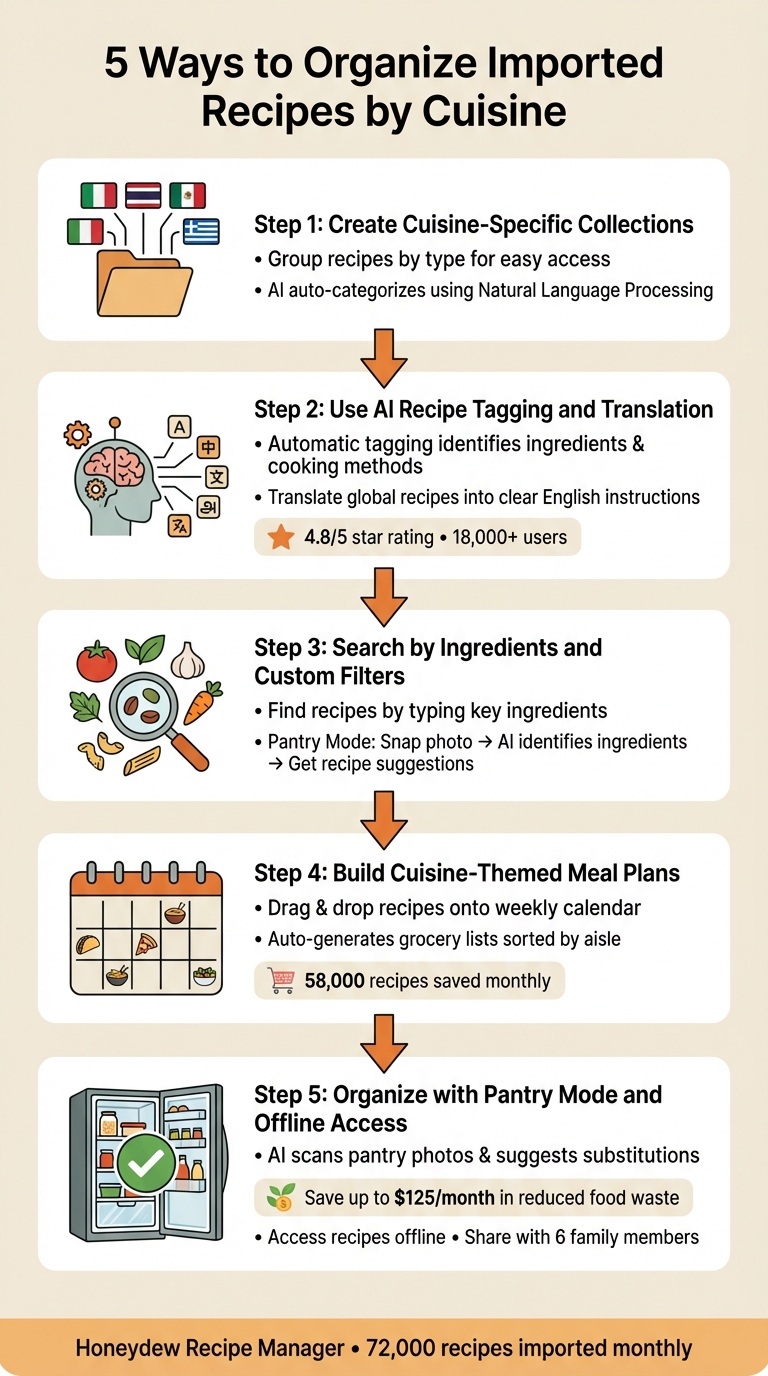
1. Create Cuisine-Specific Collections
Imagine cuisine-specific collections as digital recipe folders. Instead of tossing all your recipes into one chaotic pile, you can neatly organize them by cuisine - Italian, Thai, Mexican, Mediterranean - making it super simple to find exactly what you’re in the mood for.
The Honeydew Recipe Manager makes this process effortless. When you share a link from TikTok or Instagram using the "share" button, Honeydew Recipe Manager automatically pulls out the recipe details and classifies them by cuisine using Natural Language Processing. That Korean bulgogi recipe? It’s instantly filed under your Korean collection. The app analyzes ingredients, cooking methods, and keywords to figure out where each recipe belongs.
This auto-classification feature takes meal planning to the next level. With Honeydew's drag-and-drop calendar, you can quickly pull recipes from your Mediterranean collection to plan a week full of Greek-inspired dinners. And if you’re using the app’s Pantry Mode, it gets even better - just snap a photo of your fridge, select your Thai collection, and see which dishes you can whip up with the lemongrass and fish sauce you already have. If you're missing a key component, use an ingredient substitution finder to keep the recipe on track.
You can also share these collections with up to six family members, creating a shared family cookbook. Whether your partner adds their favorite Chinese stir-fry recipes or you save French pastry ideas, everyone contributes, and the recipes stay organized and easy to access.
Plus, searching is a breeze with digital collections. Forget digging through recipe cards or endlessly scrolling through saved posts - just type "Vietnamese", and every pho, banh mi, and spring roll recipe pops up in seconds.
2. Use AI Recipe Tagging and Translation
AI tools are changing how recipes are organized and accessed, making the process smoother and more intuitive.
Say goodbye to manual tagging - AI steps in to handle it for you. As soon as you import a recipe, the app uses Natural Language Processing (NLP) and computer vision to identify ingredients, cooking methods, and keywords. This means that your favorite Thai basil chicken video is instantly categorized as Thai cuisine without you lifting a finger.
But AI doesn’t stop at tagging. Translation features open up a whole new world of recipes. Imagine stumbling upon a mouthwatering Korean dish on Instagram but having no clue what the instructions say. With one tap, AI translates it into clear, structured English. You’ll get ingredient lists in familiar measurements like cups and tablespoons, along with easy-to-follow steps. No more deciphering "200g" or struggling through clunky Google Translate results.
"Honeydew's recipe translation feature lets me try recipes from around the world. It's like having a personal chef!" - Lisa H.
This effortless translation makes it simple to turn global recipes into practical meal plans with pantry integration.
Another standout feature? AI removes the clutter. Instead of wading through long blog posts and ads to find the actual recipe, the app extracts just the essentials: ingredients and instructions. As Maya R., a Honeydew user, explains: "I just share the Reel link and suddenly I have a clean ingredient list and instructions without the 10-page blog story."
For those who want even more, Honeydew Plus ($4.17/month) offers advanced capabilities. Snap a photo of a printed recipe - like your grandmother’s handwritten French tart instructions or a page from a Japanese cookbook - and the app’s OCR technology digitizes, translates, and organizes it instantly. With over 18,000 users saving approximately 72,000 recipes monthly, it’s clear why Honeydew boasts a 4.8/5 star rating. These AI tools make organizing recipes from any cuisine effortless.
3. Search by Ingredients and Custom Filters
Searching by ingredients makes it easy to find exactly what you're craving in your recipe collection. Let’s say you're in the mood for Southeast Asian flavors - type in "galangal" or "kaffir lime leaves", and you’ll instantly pull up Thai or Vietnamese dishes. Craving Italian? Search for "arborio rice" or "pancetta", and authentic risottos or pasta recipes will pop right up.
This feature works seamlessly with custom filters for even more precision. For example, you can search for "miso" within your "East Asian" recipes and apply a vegan filter to narrow it down. It’s a lifesaver when you can’t quite remember a recipe name but know the key ingredients.
Another handy tool is Pantry Mode. Snap a quick photo of the ingredients in your fridge, and the app’s AI will identify what you have. It then suggests recipes from your collection that match. Got gochujang, sesame oil, and tofu? The app will instantly recommend Korean dishes you can make without a grocery run.
This search feature also shines when AI-generated tags don’t quite fit fusion dishes. For instance, a Korean-Mexican taco might not be perfectly categorized, but searching for ingredients like "kimchi" or "gochugaru" ensures it still shows up. By focusing on ingredients, you’ll never lose track of recipes, even when cuisines overlap.
Combining ingredient searches with your curated collections makes digital recipe organization and meal planning easier and ensures every recipe in your library gets its moment to shine.
4. Build Cuisine-Themed Meal Plans
After easily finding recipes by ingredients, you can simplify your week by planning meals around a specific cuisine.
Focusing on one cuisine for the week transforms a collection of unrelated recipes into a seamless cooking experience. Instead of jumping between different food traditions each night, dedicate the week to flavors from one region. For example, an East Asian-themed week might revolve around soy sauce, ginger, and sesame oil, while a Mediterranean week could feature olive oil, garlic, and tomatoes. This approach not only streamlines grocery shopping but also helps you dive deeper into the cooking styles of each cuisine. Honeydew Recipe Manager makes this process even simpler, bringing organization and inspiration to your meal planning.
With its AI-powered meal planner, Honeydew lets you create themed menus in minutes. Drag and drop your favorite recipes onto a digital calendar to set up fun nights like "Tikka Masala Tuesday" or "Mediterranean Friday." The app then generates a grocery list sorted by aisle and even syncs with Instacart for quick, hassle-free ordering. With about 58,000 recipes saved by users each month, you’ll never run out of ideas for your themed weeks.
Pairing cuisine-themed planning with pantry management boosts efficiency even further. Honeydew suggests recipes based on what you already have at home. As James L. shared:
"The smart grocery lists save me hundreds of dollars a month. I love how it suggests recipes based on what I already have!"
You can also batch-cook staples like a big pot of rice for Asian dishes or marinara sauce for Italian meals, cutting down on prep time and reducing food waste. This method also allows you to explore regional cooking techniques - like fermentation or spice blending - that bring out the unique essence of each cuisine.
5. Organize with Pantry Mode and Offline Access
Keeping track of your kitchen inventory makes it easier to organize recipes by cuisine. Pantry Mode takes this a step further, connecting your actual inventory to your recipe collection. It’s a practical way to act on your saved recipes without the guesswork.
Here’s how it works: Pantry Mode uses AI to scan photos of your fridge or pantry, identifying ingredients and cross-checking them with your recipe collections. It flags missing items and even suggests substitutions for recipes like Thai curry or French dishes. For instance, if you’re planning a French-themed menu but lack a specific herb, the AI can recommend alternatives based on what you already have. This keeps your meal planning flexible and avoids unnecessary trips to the store.
Offline access adds another layer of convenience. Even without an Internet connection, you can access your recipe library, whether you’re cooking at home or shopping for groceries. Plus, you can share these offline meal plans with up to six family members, keeping everyone on the same page with your chosen meals.
Together, Pantry Mode and offline functionality make meal planning more efficient and help reduce food waste. A November 2025 CNET test found that AI-powered meal planning could save families up to $125 a month in reduced food waste. One user even reported saving $100 weekly. Digital parenting expert Abby Brody shared her experience:
"Letting AI help me make the most of what I already have saves our family of four roughly $100 a week."
Conclusion
Turn your chaotic collection of social media recipe saves into a well-organized, easy-to-use cookbook. Sorting your imported recipes by cuisine is a breeze with the right tools. Features like cuisine-specific collections, AI-driven tagging (with translation), ingredient searches with custom filters, AI meal planning for themed nights, and Pantry Mode with offline access make it possible to transform a messy recipe stash into a streamlined cooking system. Honeydew Recipe Manager serves as the hub for all of this, simplifying meal planning and bringing order to your culinary adventures.
The magic happens when these features work together. Import a recipe from social media, and AI takes care of the organization instantly. From there, you can filter recipes by ingredients, plan themed meals for the week, and spend more time cooking rather than scrolling through endless unsorted saves. With Honeydew users importing around 72,000 recipes each month, this approach turns digital clutter into a powerful resource for your kitchen.
Start small: choose a cuisine you love - maybe Italian or Indian - and create your first collection. Tag recipes, map out themed meal plans, and see how much easier your weekly routine becomes. The app’s smart grocery lists and ingredient substitution features handle the nitty-gritty details, leaving you free to focus on cooking.
Whether you’re planning a cozy pasta night or trying your hand at Japanese dishes for the first time, Honeydew Recipe Manager combines all these tools in one place. Import recipes from any social media platform, let AI organize them, and build meal plans based on what’s already in your pantry. These strategies simplify your cooking routine and make grocery shopping more efficient. Dive in today and bring some order - and fun - back to your kitchen.
FAQs
How does Honeydew know a recipe’s cuisine?
Honeydew leverages AI to break down a recipe by examining its ingredients, cooking methods, and distinctive elements. By analyzing these aspects, it uncovers patterns and traits linked to particular cuisines, ensuring recipes are categorized with precision.
Can I fix a recipe if it’s tagged wrong?
Yes, you can update a recipe’s tags in Honeydew Recipe Manager. The app allows you to edit tags and categories, making it easy to fix any misclassifications. This ensures your recipes are organized correctly - whether by cuisine, meal type, or other criteria - helping to streamline your meal planning process.
Will my recipes work offline while I cook?
Yes, you can access your recipes offline as long as you've saved or imported them into the Honeydew Recipe Manager app. This feature lets you organize and use your recipes without needing an internet connection, making it perfect for cooking anytime, anywhere.