How to Set Custom Nutrition Goals in Meal Planning Apps
Set personalized calorie, macro, and micronutrient targets in meal-planning apps using BMR/TDEE, AI tools, recipe swaps, pantry mode, and weekly tracking.


Want to take control of your diet? Setting custom nutrition goals in meal planning apps can help you meet health objectives like weight loss, muscle gain, or managing medical conditions. Here's how to do it:
- Understand your needs: Calculate your Basal Metabolic Rate (BMR) and Total Daily Energy Expenditure (TDEE) to determine calorie and macronutrient targets.
- Set goals in your app: Use tools like sliders or AI assistants to input calories, protein, carbs, and fat ratios.
- Track micronutrients: Focus on vitamins, minerals, and dietary preferences like low-sodium or high-fiber diets.
- Use AI tools: Apps like Honeydew Recipe Manager automate calorie tracking, suggest ingredient swaps, and even plan meals based on your pantry.
- Adjust as needed: Monitor progress and tweak goals every 2–4 weeks to stay on track.
With features like real-time tracking, recipe suggestions, and smart substitutions, apps simplify meal planning and help you stick to your goals.
This Might Be the Smartest Nutrition App Ever – My Honest Review
Understanding Your Nutrition Needs
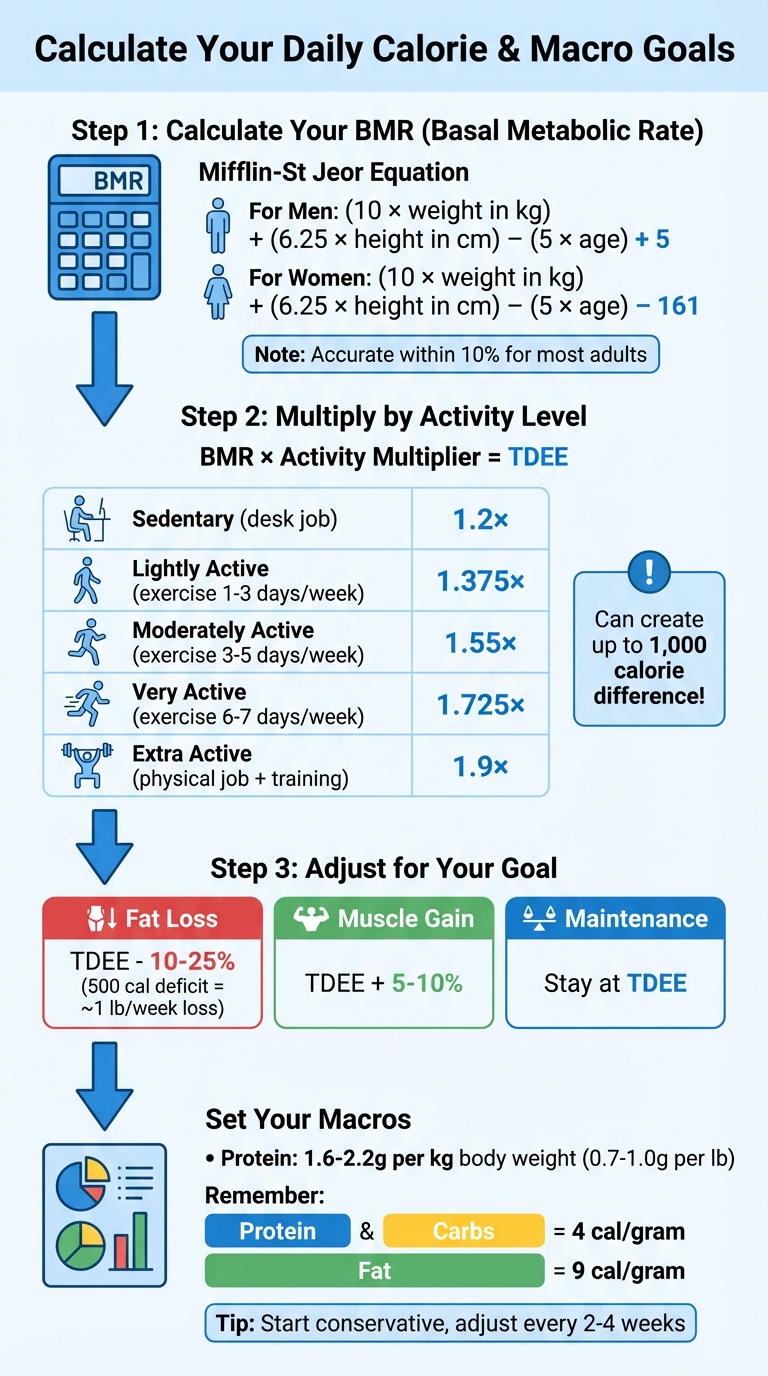
How to Calculate Your Daily Calorie and Macro Goals: BMR to TDEE Formula Guide
Before diving into custom goals in a meal planning app, it's important to understand how your body uses energy and how to distribute those calories among protein, carbohydrates, and fats. This starts with calculating your Basal Metabolic Rate (BMR) - the number of calories your body needs to maintain basic functions like breathing and circulation. From there, you multiply your BMR by an activity level factor to determine your Total Daily Energy Expenditure (TDEE).
Calculating Calorie and Macro Goals
The Mifflin-St Jeor equation is widely used for estimating BMR because it’s accurate for most adults within about 10% of their actual energy expenditure. Here’s how it works:
- For men: (10 × weight in kg) + (6.25 × height in cm) – (5 × age) + 5
- For women: (10 × weight in kg) + (6.25 × height in cm) – (5 × age) – 161
Once you have your BMR, multiply it by your activity level to get your TDEE. The multiplier varies based on how active you are:
| Activity Level | Description | Multiplier |
|---|---|---|
| Sedentary | Desk job, little to no exercise | 1.2 |
| Lightly Active | Light exercise 1–3 days/week | 1.375 |
| Moderately Active | Moderate exercise 3–5 days/week | 1.55 |
| Very Active | Hard exercise 6–7 days/week | 1.725 |
| Extra Active | Physical job and intense training | 1.9 |
For example, the same person could have up to a 1,000-calorie difference in TDEE depending on whether they lead a sedentary or extra-active lifestyle.
Once your TDEE is calculated, adjust your calorie intake based on your goals:
- Fat loss: Subtract 10–25% of your TDEE. A 500-calorie daily deficit typically results in losing about 1 pound per week.
- Muscle gain: Add 5–10% to your TDEE.
- Maintenance: Stick to your TDEE.
When dividing your calories into macronutrients, focus on protein. Aim for 1.6–2.2 grams per kilogram of body weight (or 0.7–1.0 grams per pound) to maintain muscle during weight loss. Keep in mind that protein and carbohydrates provide 4 calories per gram, while fat provides 9 calories per gram. Since people often overestimate their activity levels, it’s best to start with a conservative multiplier and adjust every 2–4 weeks based on your progress.
Setting Micronutrient and Dietary Preference Targets
While calories and macros determine weight changes, micronutrients - like vitamins and minerals - are essential for things like immunity, bone health, and energy production. Setting specific targets can help you avoid deficiencies (staying above the Lower Threshold Intake) and prevent overconsumption (staying below the Tolerable Upper Intake Level). The Recommended Dietary Allowances (RDAs) cover the needs of about 97.5% of healthy people in specific age and sex groups.
For example, if weight loss is your goal, fiber is crucial for keeping you full and regulating blood sugar. On the other hand, if you’re managing hypertension, keeping an eye on sodium is key. When tracking micronutrients, it’s better to rely on data from research-grade food databases instead of branded products, as many labels don’t include complete vitamin and mineral details. Additionally, compounds like phytates and oxalates in some foods can interfere with mineral absorption (e.g., calcium and zinc), so monitoring intake can provide valuable insights.
Consulting Professionals for Guidance
While calculators and formulas are useful starting points, your body’s feedback ultimately determines what works. If you’re managing conditions like insulin resistance, heart disease, or digestive issues - or if you’re following a specialized diet such as Low FODMAP - consult a registered dietitian or doctor to tailor your targets. Experts recommend a minimum daily intake of at least 1,200 calories for women and 1,500 for men to avoid nutrient deficiencies and metabolic issues. Additionally, during recovery from surgery or major injuries, your metabolic rate can jump by 10–25%, requiring temporary adjustments that a healthcare provider can guide you through.
With this foundational understanding, you’re ready to set precise and effective targets in your meal planning app. You can also use AI meal planning for ingredient prep to streamline your cooking process once your goals are set.
Navigating Nutrition Settings in Honeydew Recipe Manager
Accessing the Nutrition Tracking Section
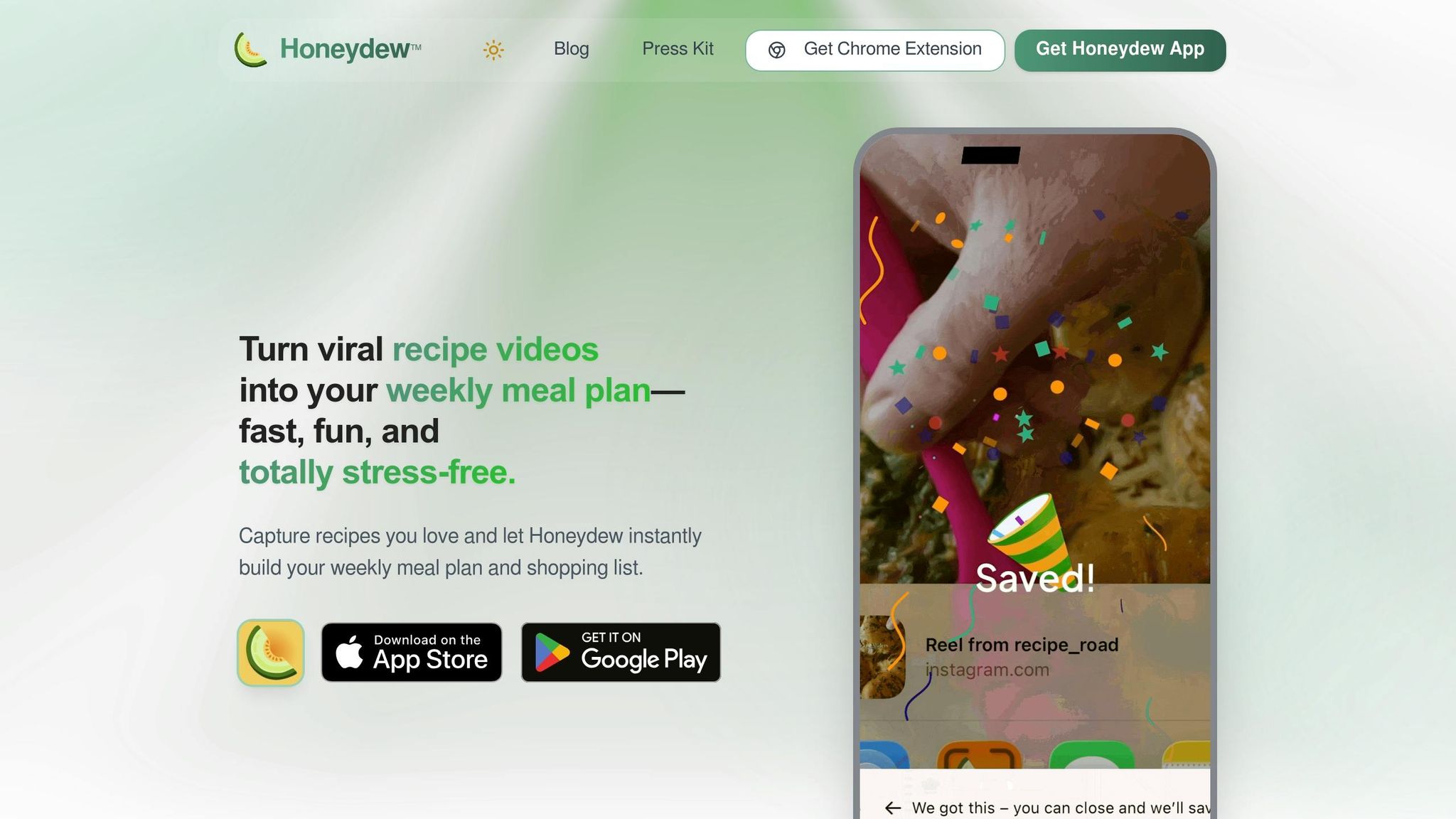
Honeydew includes a Nutrition Tracking section on your dashboard, offering a clear view of your daily intake for calories, protein, fat, carbs, and fiber. The app automatically gathers this data from recipes you import, whether they’re from social media platforms or websites.
Want to set custom goals? Use the "Ask Honey" AI assistant to type or speak your preferences. For instance, you could say, “Plan a week of meals with 1,500 calories a day,” and the assistant will handle the rest. As you add recipes to your meal planning calendar, the app updates your nutritional totals in real time. This ensures you get immediate feedback on whether you’re hitting your targets. Impressively, this method achieves an 84.19% macronutrient accuracy rate, compared to the 35–40% accuracy of manual planning.
Let’s dive into how the auto calculator can fine-tune your goals even further.
Using the Auto Calorie and Macro Calculator
Once you’ve reviewed your daily nutritional breakdown, you can refine the details using the auto calculator. This AI-powered tool pulls calorie and macronutrient data directly from saved recipes, eliminating the need for manual calculations. Want to adjust your targets? Just use a voice or text command. If a recipe exceeds your daily calorie limit, the AI assistant can suggest ingredient swaps to lower the total.
The Pantry Mode feature adds another layer of convenience. Simply take a photo of your fridge, and the AI will prioritize recipes that use what you already have while keeping your nutrition goals in mind. Digital parenting expert Abby Brody shared her experience:
"Letting AI help me make the most of what I already have saves our family of four roughly $100 a week".
On top of saving money, this AI-driven approach can cut your weekly meal planning time from 5–6 hours to under 1.5 hours.
How to Set and Adjust Nutrition Goals
Inputting Calorie and Macro Goals
With Honeydew Recipe Manager, you can manually set your daily calorie goals and tweak macronutrient ratios using intuitive sliders or percentage inputs. When adjusting macros - protein, carbohydrates, and fats - their combined percentages must equal 100%. Prefer a more automated approach? Just ask the "Ask Honey" AI assistant. For instance, you can say, "Plan meals for a week with 1,500 calories per day," and the system will handle the setup for you effortlessly.
The app also features a handy Recipe Calorie Estimator. By entering your ingredients and serving sizes, it calculates total and per-serving calorie counts instantly, giving you precise insights.
Once your calorie and macro goals are set, you can move on to fine-tuning your micronutrient targets for a fully personalized dietary profile.
Customizing Micronutrient Targets
Honeydew goes beyond the basics by allowing you to customize your profile with specific dietary needs. Whether you're managing allergies, intolerances, or following preferences like keto, vegan, or gluten-free, the app's AI adapts accordingly. It even lets you modify recipes on the fly. For example, you can ask, "Make this recipe dairy-free," and the AI will adjust the ingredients and instructions to suit your needs.
"The ingredient substitution feature is a game-changer for my dietary restrictions. I can adapt any recipe easily!"
This level of flexibility ensures that your meals align perfectly with your health goals and lifestyle.
Saving and Reviewing Your Goals
Once you've set your targets, reviewing and refining them is simple. The app automatically saves your preferences and recalculates totals whenever a new recipe is added. A visual calendar helps you track your weekly nutrition balance, making it easy to adjust as needed. Plus, your plans are accessible offline on both iOS and Android devices.
For those on the Honeydew Plus plan ($4.17 per month), you can sync goals and meal plans across up to six devices, keeping everyone in your household on the same page. The calendar view provides a clear breakdown of your nutrient intake, helping you identify trends and make adjustments to stay on track.
Using AI Meal Plans and Tracking to Meet Your Goals
Generating Weekly AI Meal Plans
Honeydew's AI assistant simplifies meal planning by tailoring menus to your specific nutrition goals. Just tell "Ask Honey" your weekly calorie target - like "Plan a week of meals with 1,500 calories a day" - and it will automatically create a complete menu for the week. The AI pulls calorie and macronutrient data from every recipe, whether it's imported from TikTok, Instagram, YouTube, or other websites.
As you add recipes to the digital meal planning calendar, your daily nutrition totals update instantly. This shows how each meal affects your protein, fat, carb, and fiber goals in real time. If a recipe exceeds your calorie limit, the portion control tool suggests adjustments, such as reducing a serving of rice. If your protein intake is too low, it offers recipe modifications to help you stay aligned with your goals.
The AI ensures precision throughout the planning process, keeping your meals consistent with your targets. Once you've built your weekly plan, the app integrates it seamlessly with daily tracking tools.
Tracking Daily Intake and Adjusting Goals
Honeydew's tracking tools make logging meals easy. Use the barcode scanner to instantly capture nutrition data for packaged foods, or let the AI automatically log details from imported recipes. Frequently prepared meals can be saved for quick re-logging, and these tools work hand-in-hand with your weekly plan to maintain consistency.
Instead of focusing on daily weight changes - which can fluctuate due to factors like water retention - track your weekly weight average. If progress slows for two to three weeks, consider reducing your daily intake by 100–150 calories, focusing on carbs or fats, while maintaining high protein levels to support muscle retention. Don't forget to log cooking oils, butter, and sauces, as these can add over 100 calories per tablespoon.
Aiming for a 5–10 gram variance in your protein and carb targets is a realistic and effective goal.
Making Substitutions and Modifying Plans
When you're out of an ingredient or need to adjust a recipe, Honeydew's smart substitution feature helps you stay on track. With prompts like "make this gluten-free" or "convert this to low-carb", the AI updates both the ingredient list and nutritional profile instantly.
You can also take a photo of your pantry, allowing the AI to prioritize recipes based on what you already have while meeting your macro goals. If you need to swap meals midweek, the app automatically adjusts your daily totals. These flexible features not only help you stick to your nutrition plan but also reduce food waste by up to 40% and save about $125 per month.
In November 2025, CNET editor Corin Cesaric tested an AI-generated meal plan for a week. By following the AI's ingredient suggestions and using pantry staples, Cesaric achieved zero food waste, avoiding the typical $125 monthly loss many U.S. households face.
Troubleshooting and Tips for Success
After setting up your custom nutrition goals, here are some troubleshooting steps and practical tips to help you stay on track with your meal planning.
Resolving Common Technical Issues
If your AI-generated meal plans seem off from your custom nutrition goals, the problem often lies in how the system selects recipes. The AI may prioritize things like grocery efficiency or ingredient variety over precise macronutrient matching, which can lead to discrepancies. To fix this, manually click "Regenerate Week" or "Regenerate Day" after updating your nutrition targets.
Strict constraints can also limit the AI's ability to meet your goals. For example, setting very short meal prep times, tight budgets, or excluding many food items reduces the pool of recipes available. To improve results, consider loosening these constraints - allow more prep time, increase your budget, or reduce food exclusions. Switching to single-day generation instead of weekly planning can also help, as single-day plans focus more on hitting exact macro targets than on grocery efficiency.
Another common issue is using fixed percentages for your nutrition profile, which makes it harder for the AI to find suitable matches. Instead, set your targets as ranges (a minimum and maximum) to give the system more flexibility. Additionally, marking certain foods as "often" or "always" can guide the AI to include your favorites more consistently.
By making these adjustments, you'll help the AI create meal plans that are better aligned with your specific nutrition goals, making it easier to stick to your plan.
Tips for Staying Consistent with Your Goals
Once you've resolved any technical issues, staying consistent becomes much simpler. Automation is your best friend here. AI-driven meal planning can cut your weekly prep time from 5–6 hours to under 1.5 hours, while delivering 84.19% macronutrient accuracy, compared to just 35–40% accuracy with manual tracking. Use household sharing features to sync meal plans and grocery lists with up to six family members, making meal prep and tracking a shared responsibility.
Batch cooking is another time-saver. Prepare 2–4 meals in just 60–90 minutes, so you always have healthy options ready for busy nights. You can also rearrange meals using the drag-and-drop calendar, and take advantage of Instacart's auto-generated grocery lists to streamline planning and shopping. These strategies ensure you stick to your nutrition goals without adding stress to your daily routine.
Conclusion
Setting personalized nutrition goals becomes much easier with the right tools in your corner. A tailored approach ensures your diet aligns perfectly with your health goals, and with the right app, meal planning can shift from a stressful task to a smooth, manageable process. Honeydew Recipe Manager brings together AI-powered recipe capture, smart ingredient substitutions, and automated nutrition tracking - all in one app that boasts a 4.8-star rating from its users.
With users saving around 72,000 recipes each month, it’s clear how much simpler sticking to health goals becomes when technology takes care of the hard work. Whether you’re counting macros to lose weight, crafting keto-friendly meals with precise net-carb tracking, or juggling multiple dietary restrictions, the app’s AI assistant adjusts recipes and creates meal plans tailored to your specific needs.
You can start with the free version available for iOS or Android to explore key features like recipe capture and meal planning. When you’re ready to dive deeper, Honeydew Plus ($4.17/month) offers unlimited recipe storage, household sharing for up to six people, and priority support.
One standout feature is Pantry Mode: snap a photo of your fridge, and the app suggests recipes that use your ingredients while meeting your nutrition targets. Plus, the Instacart integration ensures you can easily shop for anything missing to stick to your plan.
The best way to get started? Keep it simple. Import a few favorite recipes, use the built-in calculator to set your initial nutrition goals, and let the AI create your first week of meals. From there, you can tweak and refine your approach as you figure out what works best for your lifestyle and dietary preferences.
FAQs
How do I pick the right activity level for TDEE?
When calculating your TDEE (Total Daily Energy Expenditure), it's important to accurately assess your daily activity level. These levels range from sedentary (like sitting at a desk most of the day) to extra active (involving intense physical activity or labor). For example:
- Sedentary: Minimal movement, such as desk jobs or little to no exercise.
- Lightly active: Light exercise or daily activities like walking.
- Moderately active: Regular exercise or physical work a few days a week.
- Very active: Intense exercise or physically demanding jobs.
- Extra active: Highly intense exercise routines or extremely physical jobs.
Choose the level that best fits your routine to ensure your TDEE calculation aligns with your energy needs. An accurate selection helps tailor the results to your lifestyle.
What should I do if my weight stalls for 2–3 weeks?
If your weight hasn't budged for 2–3 weeks, it might be time to tweak your nutrition targets to align with your current goals. Begin by entering your updated weight into your meal planning app, such as Honeydew Recipe Manager. The app will likely suggest adjustments to your nutrition targets. Carefully review these recommendations, apply the updates, and either regenerate your meal plan or modify portion sizes. These changes can help you overcome the plateau and get back on track.
How accurate are nutrition totals from imported recipes?
When it comes to nutrition totals from imported recipes, they’re usually dependable - especially with tools like Honeydew Recipe Manager. This app uses advanced AI to break down ingredients, scan nutrition labels, tweak portion sizes, and even estimate micronutrients to improve accuracy. That said, the precision still hinges on factors like how clear the recipe is and the quality of user inputs. The AI also steps in to standardize measurements and fill in missing details, making it a solid option for meal planning and tracking.